

Domain Verification
To ensure security and prevent data spoofing, you must verify ownership of your domain.
Domain Verification
To ensure security and prevent data spoofing, you must verify ownership of your domain. We offer two methods to verify your site.
Verification Methods
Choose the method that best fits your technical setup.
DNS TXT Record
Best for domain-level verification without modifying website code.
Copy the TXT Record
Copy the verification token from your dashboard settings ( Settings > API keys ):
ucoder-insights-id=YOUR_DOMAIN_VERIFICATION_IDAdd to DNS Provider
Log in to your domain registrar (GoDaddy, Namecheap, Cloudflare) and add a new record. Use _ucoderinsight.insights as the host — most providers automatically append your domain to it.
| Type | Host / Name | Value | TTL |
|---|---|---|---|
| TXT | _ucoderinsight.insights | ucoder-insights-id=YOUR_DOMAIN_VERIFICATION_ID | Auto |
Verify
DNS changes are usually visible within a few minutes, but can take up to a few hours depending on your provider. Click Verify once it's propagated. Check DNS propagation using tools like DNS Checker.
What happens after verification?
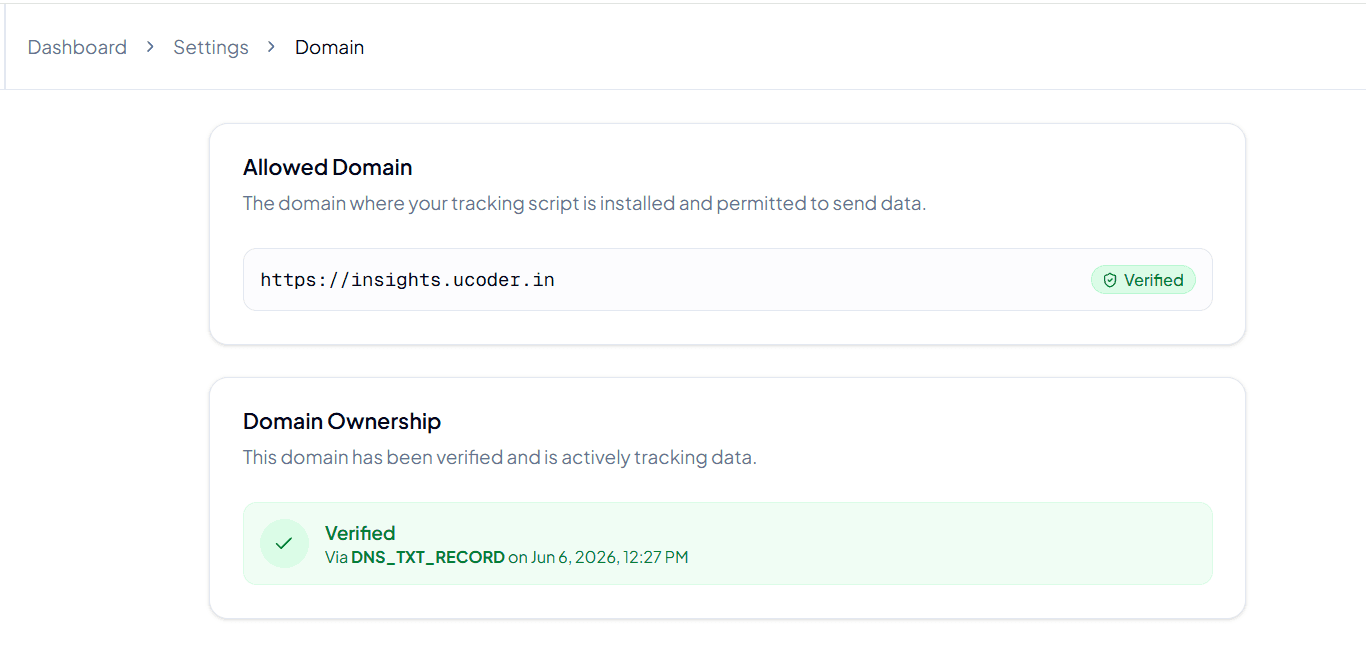
Once verified, you'll see a success badge in your project settings, showing which method was used and when.
Domain Ownership Verified
Example: Verified via Meta Tag on Jan 15, 2026, 10:30 AM
Understanding the Security Logic
Why do we enforce domain verification? It's not just a formality — it protects your account quota and data integrity.
The Data Flow Process
Here's how our server decides whether to accept or reject an analytics event:
Verified Domain
- The request
Originmatches your verified list. - Action: Data is accepted and processed.
- Result: Analytics appear on your dashboard instantly.
Unverified Domain
- The request comes from an unknown source (e.g., a spam site).
- Action: Request is blocked immediately (
403 Forbidden). - Result: No data is recorded, protecting your quota.
Why strict verification matters
Without verification, anyone with your Public Tracking ID could send fake data to your dashboard.
Prevents Spam
Stops bad actors from flooding your dashboard with garbage data.
Saves Quota
Ensures your monthly event limit isn't wasted by unauthorized sites.
Data Integrity
Guarantees that 100% of your analytics data comes from real users.