Public Share Links
Share a read-only dashboard of your project publicly, without requiring login.
Public Share Links
A public dashboard lets you share a read-only view of your project's analytics with anyone, without them needing to log in. This is useful for sharing metrics with clients, stakeholders, or the public.
Create a public link
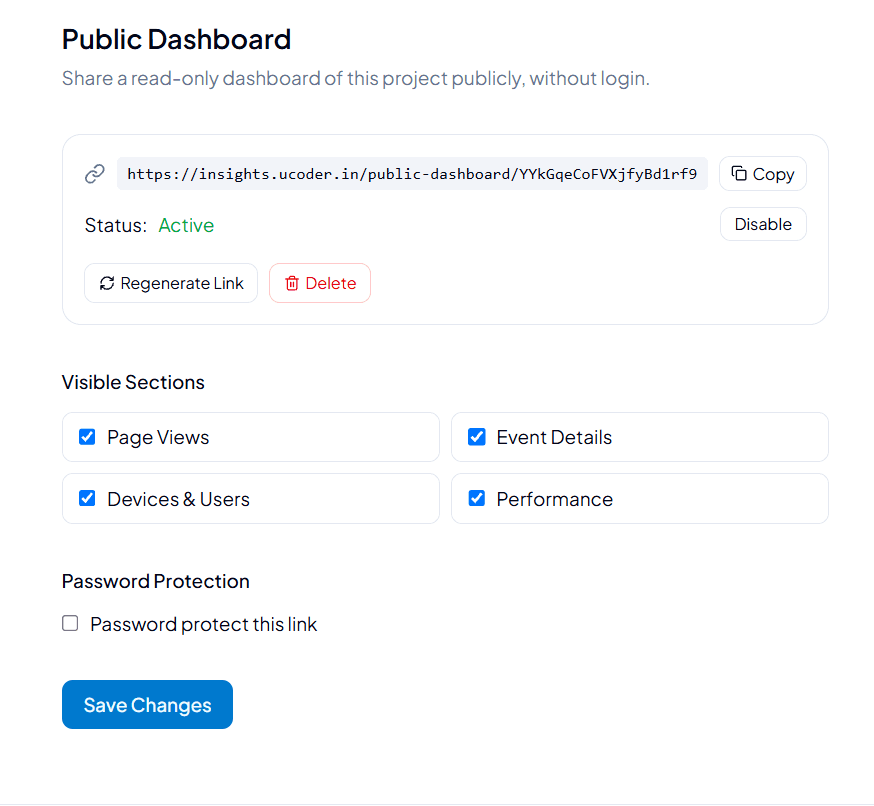
- Go to your project settings and open the Public Dashboard section.
- A shareable link is generated automatically, in the form
https://insights.ucoder.in/public-dashboard/<token>. - Choose which sections should be visible on the shared dashboard (see Visible sections below).
- Optionally enable password protection.
- Click Save Changes to apply your settings.
Link management
| Action | Description |
|---|---|
| Copy | Copies the public link to your clipboard. |
| Status | Shows whether the link is currently Active or disabled. |
| Disable | Temporarily deactivates the link without deleting it. The link stops working until re-enabled. |
| Regenerate Link | Invalidates the current link and generates a new token. Anyone with the old link loses access. |
| Delete | Permanently removes the public dashboard configuration. |
Regenerating or deleting a link immediately invalidates the old URL. Anyone you previously shared it with will no longer be able to access the dashboard.
Visible sections
Choose which parts of your analytics are exposed on the public dashboard. Each section can be toggled independently:
| Section | Description |
|---|---|
| Page Views | Page view counts and trends. |
| Event Details | Custom event data and breakdowns. |
| Devices & Users | Device, browser, and visitor breakdowns. |
| Performance | Page performance and Core Web Vitals metrics. |
Sections are enabled by default. Uncheck any section you don't want visible on the public link before sharing it.
Password protection
Enable Password protect this link to require a password before visitors can view the public dashboard. This adds a layer of access control on top of the unguessable link token, useful when sharing with a specific audience rather than making the dashboard fully public.
Keep in mind:
- A public link is a read-only view; visitors cannot see or modify any project settings.
- Anyone with the link (and password, if set) can view the enabled sections until the link is disabled, regenerated, or deleted.
- Remember to click Save Changes after updating visible sections or password settings — changes are not applied automatically.