

Configuration
Detailed guide on configuring Ucoder Insight options.
Configuration
In this section, we will explore the various configuration options available in Ucoder Insight. Proper configuration is essential to ensure that you get the most out of the tool and that it fits seamlessly into your development workflow.
General Settings
The general settings allow you to customize the overall behavior of Ucoder Insight. This includes options for data collection, performance optimization, and user interface preferences.
API Keys
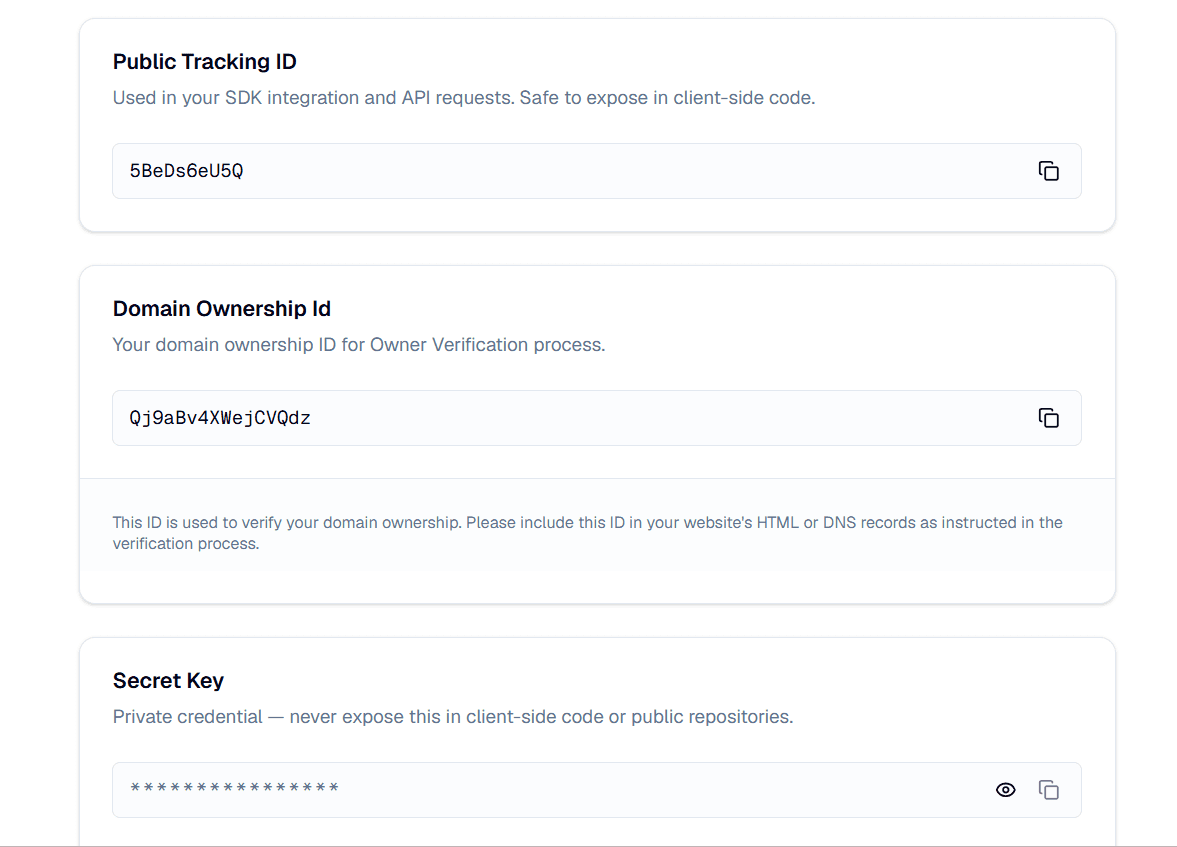
To use Ucoder Insight, you need your project's keys from the Ucoder Dashboard (Settings > General). There are three types of identifiers:
Public Tracking ID
The Public Tracking ID is used for client-side tracking and should be included in your frontend code. It is safe to expose publicly.
Secret Key
This key is used for server-side applications and has full permissions. It should be kept secure and never exposed in client-side code. It is needed for features that require access to sensitive data or actions, such as managing projects or accessing detailed analytics.
Domain Ownership ID
This key is used to identify the owner of the project. It is used for features that require ownership verification, such as transferring project ownership or accessing certain administrative features.
Note
Your Public Tracking ID is safe to expose in client-side code — you do not need to hide it behind a server. Your Secret Key is different and must never be exposed publicly.
Options Reference
Here is a reference of the available configuration options in Ucoder Insight:
| Option Name | Type | Default Value | Description |
|---|---|---|---|
notFoundPath | string | string[] | "autodetect" | Path(s) treated as a 404. Auto-detected by default; not tracked as a pageview. |
notTrackPath | string | string[] | [] | The paths to exclude from tracking. |
debug | boolean | false | Enable debug mode for detailed logging. |
apiUrl | string | undefined | Your custom backend URL. |
trackScroll | false | false | Pro plan opt-out only. See note below. |
trackPerformance | false | false | Pro plan opt-out only. See note below. |
About trackScroll and trackPerformance
These two options are Pro-plan-only local opt-outs. Their type is intentionally
false (not boolean) — passing true is a compile-time error, since "forcing
on" is never a valid local override. Free plan users cannot set these options at all.
notFoundPath
By default, Ucoder Insight automatically detects 404 / not-found pages — for example, when a user hits a broken or non-existent route in a Next.js app. These pages are excluded from your page analytics automatically, so random or invalid URLs don't pollute your dashboard with noisy, one-off page entries.
If your app uses a custom 404 route (not the framework default), or you want to explicitly mark additional paths as "not found," you can override the autodetected behavior by passing your own path(s):
initUcoderInsight("YOUR_PUBLIC_TRACKING_ID", {
  notFoundPath: '/my-custom-404',
  // or an array:
  // notFoundPath: ['/my-custom-404', '/gone'],
});
Supports wildcards, e.g. '/notfound/*'.
Note
In most cases, you don't need to set this option manually — autodetection handles standard 404 pages out of the box. Only override it if your app uses a non-standard not-found route.
notTrackPath
This option allows you to specify a path or an array of paths that should be
excluded from tracking. By default, it is set to [], meaning all paths are
tracked. Use this if you have pages you don't want analytics on — for example,
internal admin routes or legal pages.
notTrackPath: ['/privacy', '/terms', '/admin/*']debug
This option enables debug mode, which provides detailed logging of Ucoder
Insight's operations in the browser console. By default, it is set to false.
Note
When debug mode is enabled, no data is sent to our servers — all events are logged to the console only. This is useful for development and troubleshooting, but it will not produce real analytics data. Only use this in development.
trackScroll
Controls scroll-depth tracking. This is a Pro plan local opt-out — it lets Pro users disable a feature they don't need. Free plan users do not have scroll tracking enabled by default and cannot toggle this option.
trackPerformance
Controls performance metric tracking (page load times, resource usage, Core Web Vitals). This is a Pro plan local opt-out — it lets Pro users disable a feature they don't need. Free plan users do not have performance tracking enabled by default and cannot toggle this option.
apiUrl
Optional custom API URL for sending tracking data. If not provided, the default API endpoint is used. This can be useful for testing or if you have a custom backend setup.
Note
Project verification and tracking configuration are always handled through
the default backend, regardless of a custom apiUrl. This keeps sensitive
configuration data isolated from custom backend URLs, preserving the security
and integrity of your tracking setup.
Example Usage
Here is a complete example configuring Ucoder Insight with all available options:
npm install ucoder-insightPass options as the second argument to initUcoderInsight.
"use client";
import { useEffect } from "react";
import { initUcoderInsight } from "ucoder-insight";

export default function Analytics() {
  useEffect(() => {
    initUcoderInsight("YOUR_PUBLIC_TRACKING_ID", {
      notFoundPath: '/404',
      notTrackPath: ['/privacy', '/terms', '/admin/*'],
      debug: true, // logs events to console instead of sending to API
      apiUrl: 'https://custom-api.yourdomain.com/track', // optional custom backend
      trackPerformance: false, // Pro plan opt-out only
      trackScroll: false, // Pro plan opt-out only
    });
  }, []);

  return null;
}
Element-Level Tracking Control
To exclude a specific element from tracking, add the data-uca-track="false" attribute to any HTML element. This is useful for sensitive information or elements that don't need analytics.
<button data-uca-track="false" class="px-4 py-2 bg-red-500 text-white rounded">
  This content will not be tracked by Ucoder Insight.
</button>
You can also use data-uca-track="true" to force tracking on a specific element even if it falls within a notTrackPath.
Input Tracking Policy
Automatically Blocked Inputs
type="password"type="email"type="tel"type="text"type="number"type="search"type="url"type="date"type="time"type="datetime-local"type="month"type="week"type="color"type="range"type="file"type="hidden"
Tracked Input Types
type="checkbox"type="radio"type="submit"type="button"type="reset"
These input types are safe to track as they don't contain sensitive user data.
Privacy Assurance
Our "Privacy by Default" engine ensures that sensitive user data remains on
the client device and is never sent to our servers. You only need to use
data-uca-track="false" for non-sensitive UI elements you wish to exclude.