Report Guide
Learn how to use our powerful analytics platform to track user behavior, monitor errors, and optimize your website for better engagement and conversions. This comprehensive guide covers click analytics, error monitoring, page performance, scroll tracking, and custom events with real data examples from our demo site.
Report Guide: Unlocking User Insights with Analytics
This powerful analytics platform automatically tracks user behavior on your website, giving you actionable insights to improve user experience and boost conversions. All data is based on sample data from our demo site.
What Does This Platform Track?
Our analytics system monitors 5 key areas of user behavior:
- Click Analytics - Every user interaction with buttons, links, and elements
- Error Monitoring - Technical issues affecting your users
- Page Performance - Views, duration, and engagement metrics
- Scroll Tracking - How users consume your content
- Custom Events - Business-specific actions you want to measure
- See the Dashboard -> Logs & Issues section for real data examples.
1. Click Analytics - Track User Interactions
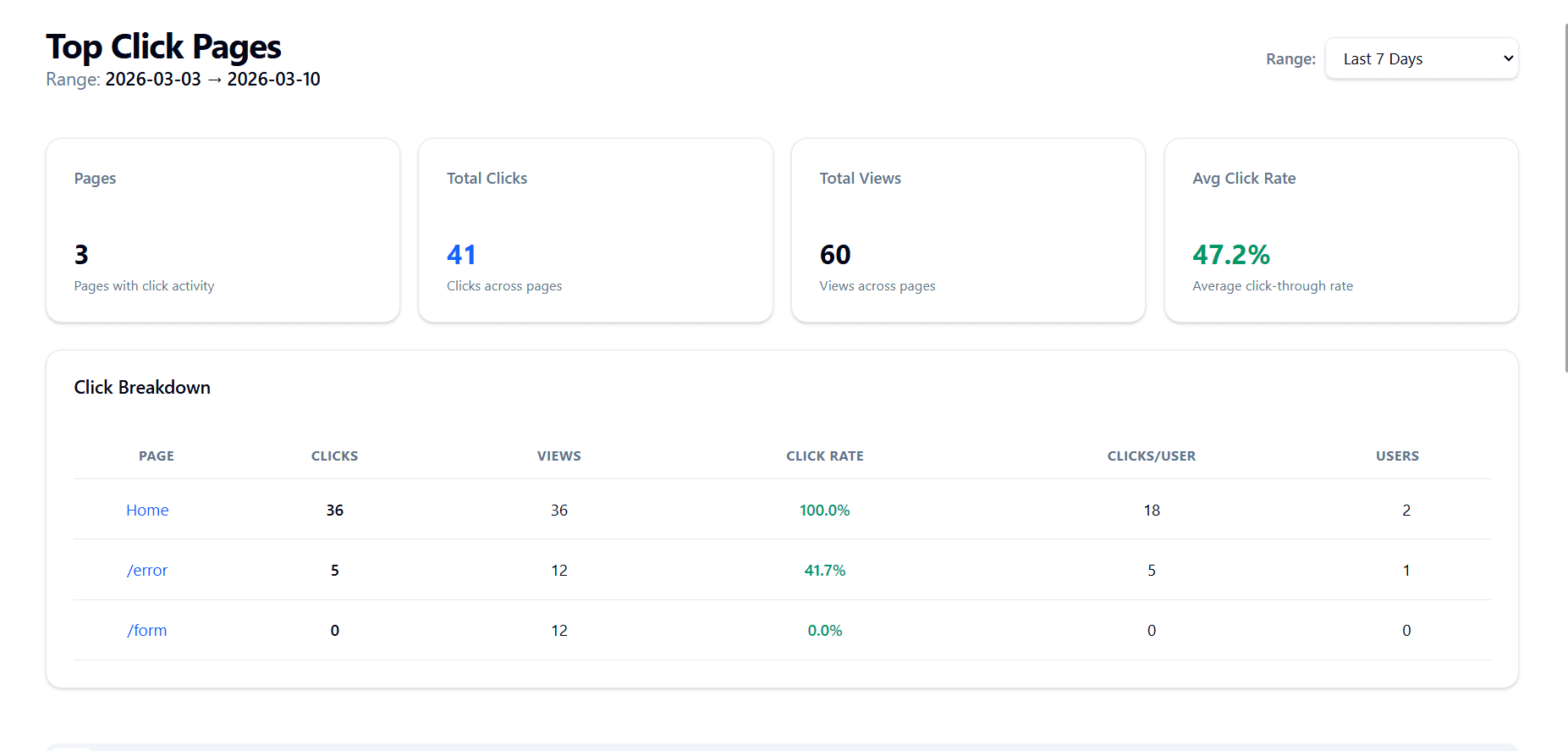
What You'll See
- Total clicks on each page
- Which elements get clicked the most
- Click rate (clicks per view)
- User engagement patterns
- All page elements that get clicked, along with their click counts, path, views, and click rates
How This Helps Your Business
Before Analytics:
- "Are users clicking our buttons?" - Unknown
- "Which pages are engaging?" - Guessing
- "What elements do users interact with?" - No idea
After Analytics:
- See exactly which elements get clicked
- Identify high-performing vs low-performing pages
- Make data-driven design decisions
- Optimize for better user engagement
2. Error Monitoring - Catch Problems Before Users Leave
What You'll See
We automatically detect and report:
- Technical errors on your pages
- Which elements are failing
- How many users are affected
- When errors occurred
Real Example from Our Platform
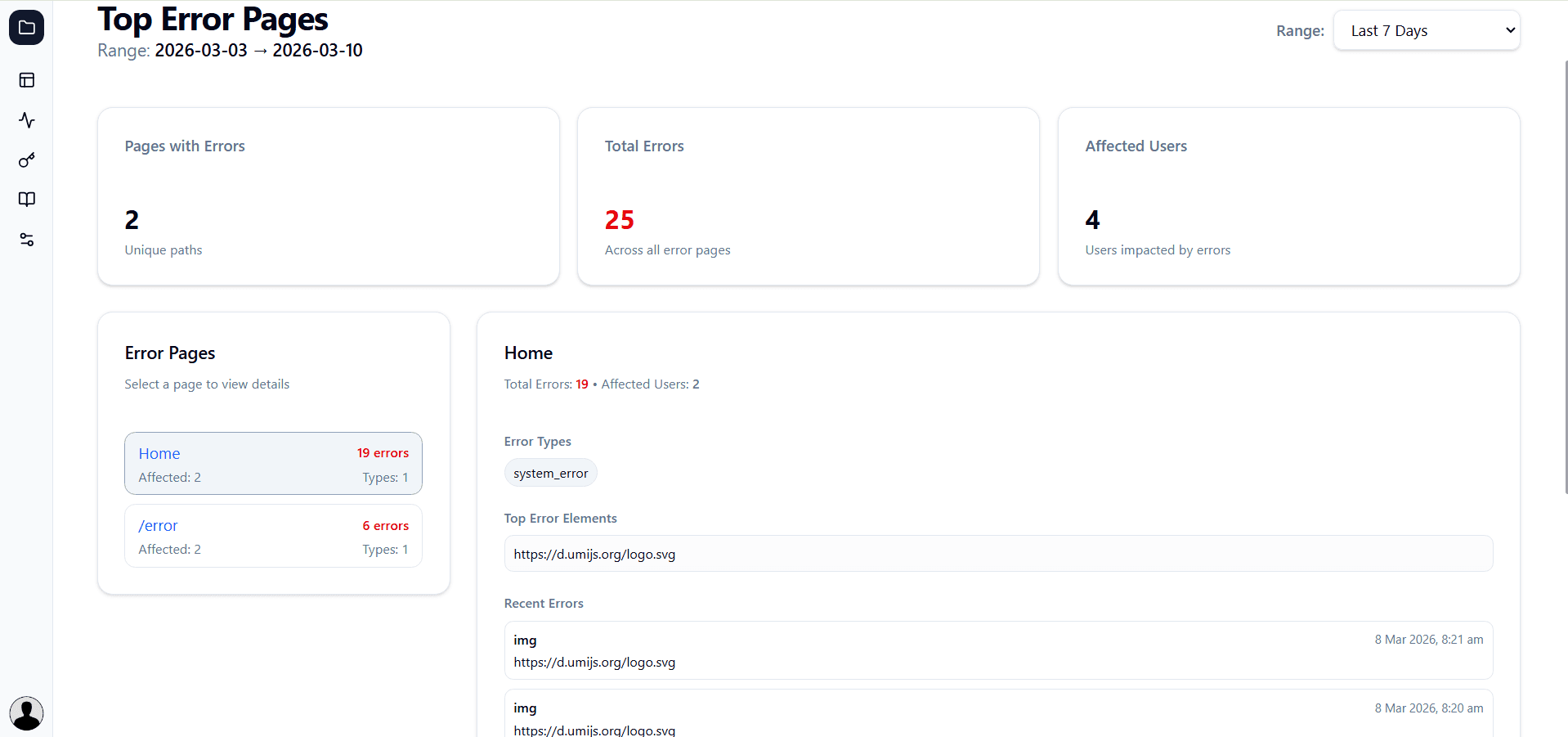
Example: Image Loading Error on Home Page
What This Tells You:
- Critical issue: Logo image not loading
- Error repeating multiple times
- Needs immediate fix
Actionable Solution:
// Problem: External CDN failing
<img src="https://d.umijs.org/logo.svg" />

// Solution: Host locally
<img src="/logo.svg" alt="Company Logo" />
What This Tells You:
- Total errors and affected users
- Which elements are broken
- When errors occur (time-based patterns)
- Some recent errors originate from your page, others from external resources (like images, scripts, etc.)
How This Helps Your Business
Without Error Monitoring:
- Users encounter errors silently
- You don't know what's broken
- Users leave frustrated
- Revenue lost
- Affects your site's performance and reputation
- Missed opportunities to fix issues
With Error Monitoring:
- Instant alerts when errors occur
- See exactly what's failing
- Fix issues before they impact many users
- Maintain professional user experience
3. Page Performance Analytics
What You'll See
Comprehensive metrics for every page:
- Page views and unique visitors
- Time spent on page
- Engagement scores
- Cross-page comparisons
Real Example from Our Platform
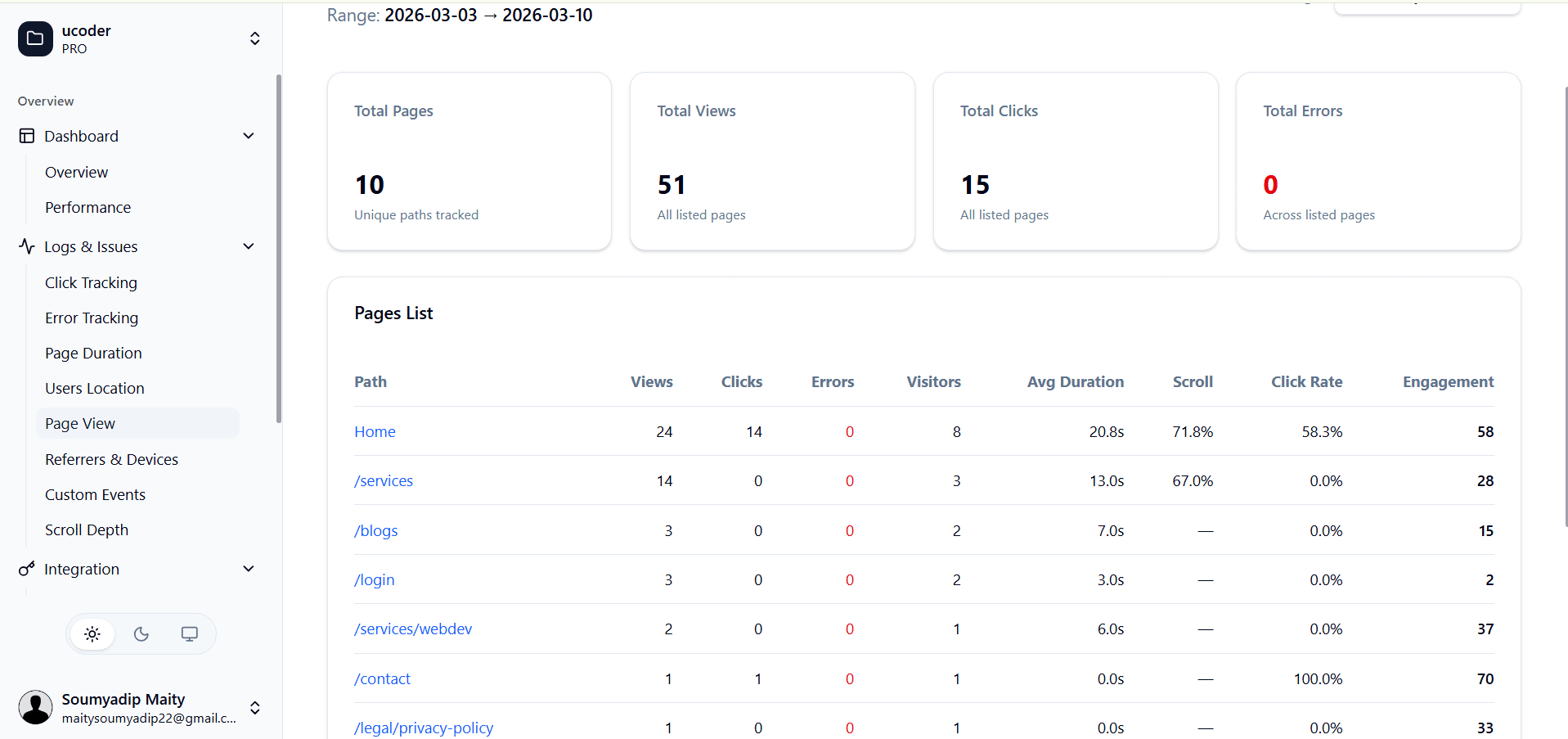
What This Tells You
- Which pages are most popular
- Where users spend the most time
- Which pages have the most engagement
- Which pages have the most errors
- Click rate (clicks per view) for each page
- Scroll depth (how far users scroll) for each page
- Views and unique visitors for each page
Before Analytics
- "Which pages are performing well?" - No data
- "Where do users spend time?" - Guessing
- "Which pages have issues?" - Unknown
After Analytics
- See exactly which pages perform best
- Identify high vs low engagement pages
- Make data-driven content decisions
4. Scroll Depth Tracking - See How Users Read Your Content
What You'll See
Understand how users consume your content:
- Average scroll depth (how far they scroll)
- Finish rate (how many reach the bottom)
- Pixel measurements
- Engagement patterns
Real Example from Our Platform
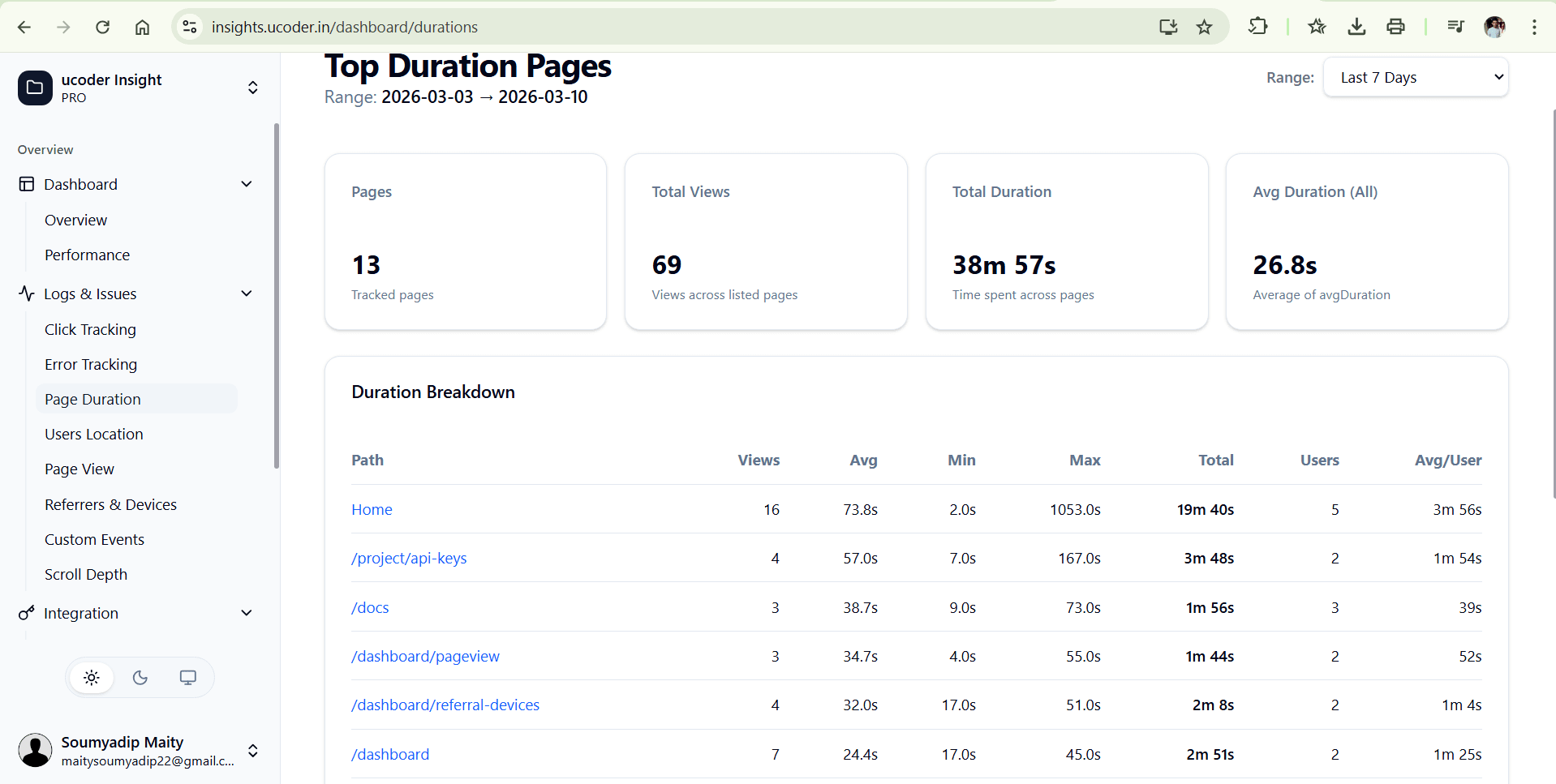
What This Tells You
- How far users scroll on average
- What percentage of users reach the end of your content
- Min and max duration of time spent on page
- Which pages have the highest scroll depth
- Affected users and total views for each page
- Total duration of time spent on page for each page
- Average duration per user for each page
How This Helps Your Business
Content Optimization:
- Know if users actually read your content
- Identify where users stop scrolling
- Place important CTAs where users actually reach
- Optimize content length based on engagement
5. Referrer Analytics - Understand Where Your Traffic Comes From
What You'll See
- Top referrers driving traffic to your site
- Bounce rates and engagement metrics for each referrer
- Which referrers lead to the most conversions
- Total users and views from each referrer
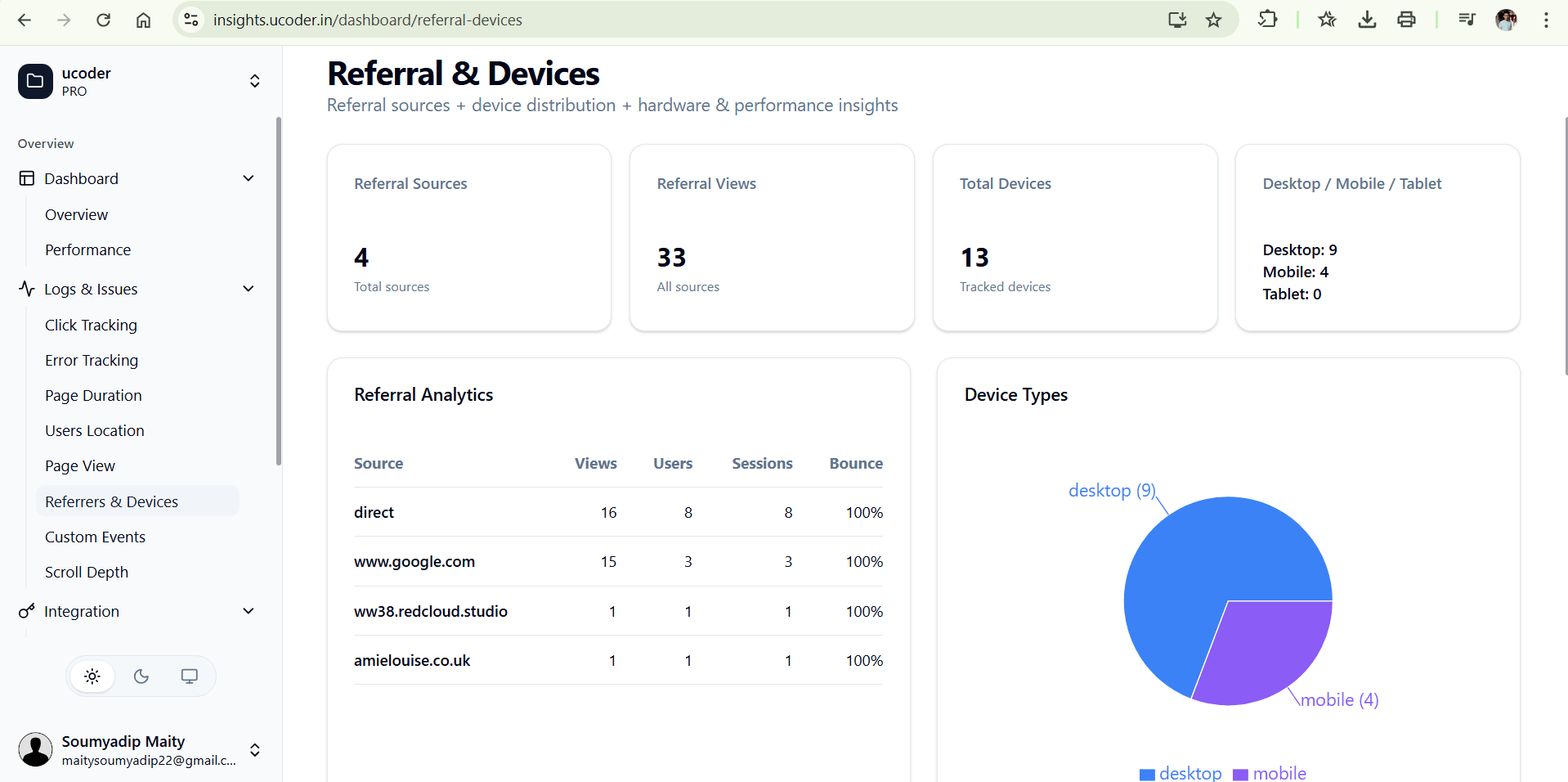
What This Tells You
- Which channels are most effective at driving traffic
- Which referrers have the highest engagement
- Where to focus your marketing efforts
- Which referrers lead to the most conversions
- Which referrers have the highest bounce rates (indicating low-quality traffic)
- Which referrers have the highest conversion rates (indicating high-quality traffic)
6. Outgoing Link Analytics - Track External Clicks
What You'll See
- Which external links users click on
- Total clicks and click rates for each outgoing link
- Which outgoing links lead to the most conversions
- Which outgoing links have the highest bounce rates (indicating users leave immediately after clicking)
Real Example from Our Platform
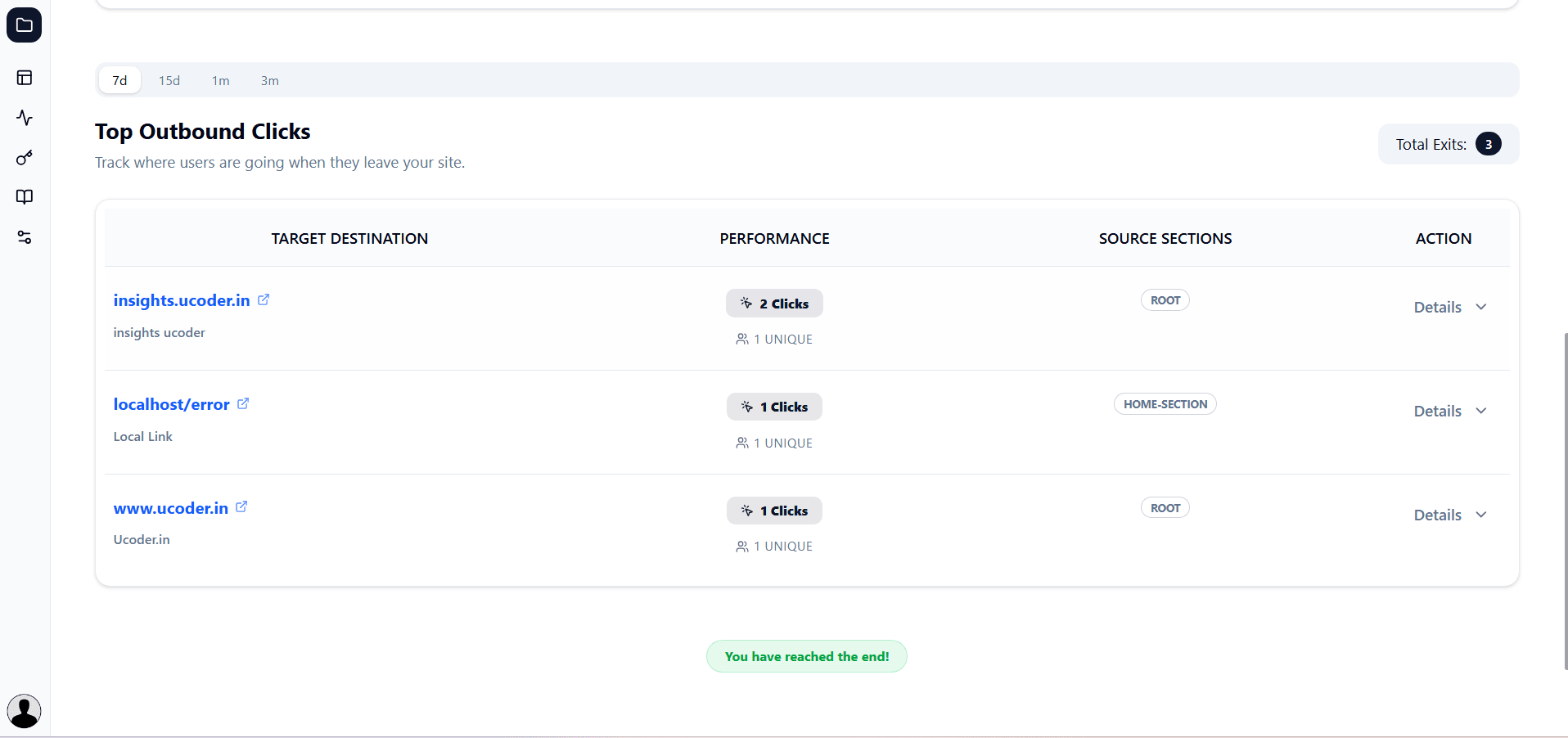
What This Tells You
- Which external resources users interact with
- Total clicks and click rates for each outgoing link
- Source section of the outgoing link (e.g. header, footer, content)
- Recent activity timeline of the outgoing link (e.g. last clicked time)
- Which outgoing links lead to the most conversions (indicating valuable partnerships or resources)
7. Custom Events - Track Your Business Goals
What You'll See
Track specific actions that matter to your business:
- Form submissions
- Sign ups
- Purchases
- Feature usage
- Any custom action you define
Real Example from Our Platform
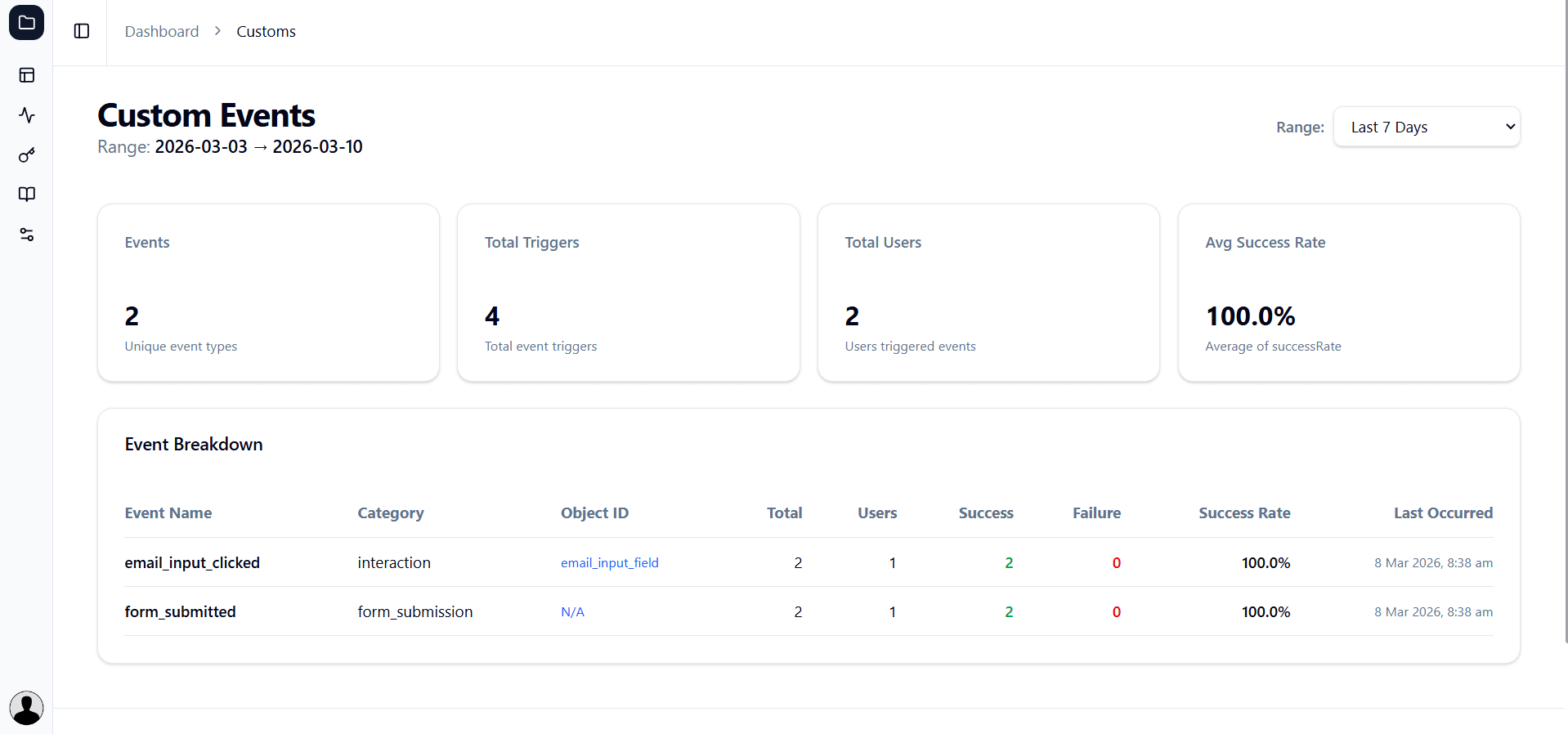
Custom Events Dashboard
Unique Events: 2 different event types
Total Triggers: 3 times events fired
Total Users: 2 users who performed actions
Success Rate: 100% (all events succeeded)
Event 1: Form Submissions
Event Name: form_submitted
Category: form_submission
Total Triggers: 2
Success Rate: 100%
Last Occurred: 24 Jan 2026, 11:00 AM
What This Tracks:
- When users submit your contact/signup form
- Success vs failure rate
- Form conversion metrics
Business Metrics:
Form Views: 14
Form Submissions: 2
Conversion Rate: 14.3%

Industry Average: 20-40%
Your Performance: 14.3%
Gap to Close: +6-26%
Actionable Insights:
- Form technically works (100% success)
- Low conversion (only 14.3%)
- Opportunity: Improve from 14% to 25%+
How to Improve:
- Reduce number of form fields
- Add trust signals (security badges)
- Improve error messages
- Add progress indicators
- Make "Submit" button more prominent
Event 2: Email Field Interaction
Event Name: email_input_clicked
Category: interaction
Object ID: email_input_field
Total Triggers: 1
Success Rate: 100%
Last Occurred: 24 Jan 2026, 11:02 AM
What This Tracks:
- When users click on the email input field
- Field-level interaction analytics
- User journey through form
Timeline:
11:00 AM - Form submitted
11:02 AM - Email field clicked (2 min later)
Possible Scenarios:
- User came back to verify email
- Form didn't clear after submission
- User re-entering information
What Success Looks Like
Week 1: Before Analytics
- "Are users engaging with our site?" - No idea
- "Which pages have problems?" - Unknown
- "Is our form working?" - Guessing
- "What should we improve?" - No data
Week 4: After Analytics
- "Click rate improved from 20% to 45%"
- "Fixed 9 image errors - no more broken pages"
- "Form conversion up from 14% to 28%"
- "Data-driven decisions, measurable results"
Key Benefits Summary
1. Know Your Users
- See exactly how users interact with your site
- Understand what they click, read, and engage with
- Make informed design decisions
2. Catch Problems Early
- Get instant alerts when errors occur
- Fix issues before they impact many users
- Maintain professional experience
3. Optimize Conversions
- Track your conversion funnels
- Identify and fix bottlenecks
- Improve conversion rates with data
4. Save Time & Money
- Stop guessing, start knowing
- Focus efforts on what actually matters
- Measure ROI of changes
5. Data-Driven Growth
- Make decisions based on real data
- Test and validate improvements
- Continuously optimize performance